Xero is cloud-native, affordable and easy to learn, with a large app marketplace and a wide network of accountants familiar with it. Sage 50 is a desktop-first product with deeper stock control, payroll through the separate Sage 50 Payroll product and CIS as a paid add-on, but it’s more expensive.
For a single entity with fewer than about 25 staff, Xero is the better fit. For an organisation that needs stock management or construction compliance and already runs Sage workflows, Sage 50 makes more sense. But if your group has outgrown both and you need multi-entity consolidation, iplicit is built for that.
Here’s a quick table that compares all three tools:
Need to choose between Xero and Sage 50?
If you typed “Xero vs Sage 50” into Google and clicked on this article, it means one of two things: you’re either picking your first accounting system, or you’ve been using one of the two platforms and are wondering if the other would be better for your organisation.
Whichever category you fall into, here’s how Xero and Sage 50 differ on key features, pricing and day-to-day use. So you can pick the one that fits.
Why listen to us?
At iplicit, we work with multiple UK finance groups that have made this decision, especially those that eventually chose our platform.
For example, A-One Insurance Group, a commercial brokerage running nine companies, started on Sage 50 but found consolidating group accounts an ordeal before moving to iplicit. Another customer, SEP2, a cybersecurity firm expanding into Ireland and the US, outgrew Xero as its multi-entity reporting needs became more complex and chose iplicit to manage its growing accounting requirements.

We have interacted with organisations that have used both tools, so we understand how Xero and Sage 50 work in practice and where their limitations become apparent as organisations grow. This article draws on that first-hand experience.
Xero vs Sage 50: the detailed comparison
Xero

Best for: cloud-first single entities that want a large app ecosystem and easy collaboration with their accountant.
Xero is a cloud-native accounting platform founded in New Zealand and now used by millions of organisations worldwide. In the UK, it’s the default choice for small and mid-sized organisations, partly because many accountancy practices run their work on it.
Xero runs completely in the browser, so there’s nothing to install. Your accountant can also access your accounts alongside you, without needing remote desktop access or a VPN.
Xero’s biggest strength is its ecosystem. Its app marketplace connects to hundreds of tools used by UK organisations, from payment gateways like Stripe and GoCardless to receipt-scanning apps and CRM systems. Bank feeds import transactions automatically through Open Banking, and the reconciliation engine suggests matches for you to approve with a click.
For a single entity with straightforward accounting needs, that combination of simplicity, cloud access and integrations is hard to beat. And that’s exactly why so many small UK organisations start with Xero.
But where Xero starts to fall short is in reporting depth and multi-entity accounting. You get just two tracking categories for tagging transactions (think cost centres or departments), with additional tracking options requiring third-party tools. Also, if you’re running more than one legal entity, each needs its own Xero subscription, and there’s no built-in group consolidation. You have to export figures to Excel or use a third-party consolidation tool. That workaround gets more cumbersome with every entity you add.
Key features
- MTD for VAT: submit VAT returns directly to HMRC from within Xero, with digital record-keeping built in
- Bank feeds and reconciliation: connects to UK banks through Open Banking and suggests transaction matches automatically
- Invoicing and payments: send invoices with built-in payment options including Stripe, GoCardless and Pay by Bank
- App marketplace: hundreds of integrations covering payroll, inventory, expenses, CRM and more
- Multi-currency: available on the Comprehensive plan (£55/mo) and above, with live exchange rates
Key limitations
- Only two tracking categories for reporting dimensions, which caps how you can segment data without add-ons
- There’s no native multi-entity consolidation, so you have to consolidate accounts manually or through a third-party app
- The number of employees you can add on payroll is capped (0 on Ignite, 1 on Grow, 5 on Comprehensive, and 10 on Ultimate). Extra employees cost £1.50 per person per month (£1 on Ultimate).
- CIS support is basic compared to Sage 50’s paid CIS add-on
- Budgeting is only available on the Comprehensive plan and above, and it’s limited compared with dedicated planning tools
Pricing
Xero charges these prices (excluding VAT) per organisation per month for its plans:
- Simple: £7/mo (Xero’s entry-level plan)
- Ignite: £18/mo (quotes, up to 20 invoices, 10 bills, basic reports)
- Grow: £39/mo (unlimited invoices, automated bill entry, payroll for 1 person, multi-step expense claims)
- Comprehensive: £55/mo (multi-currency, budgeting, financial health scorecards, payroll for 5 people)
- Ultimate: £70/mo (project tracking, KPI analysis, industry benchmarking, payroll for 10 people )
Pros
- Easy to learn, with a clean interface that most people can work well with within a week.
- Most accountants already use Xero, so it makes collaboration straightforward.
- The app marketplace lets you plug in specialist tools (inventory, project management, HR) without switching platforms.
Cons
- Multi-entity setup gets expensive because each organisation needs its own subscription
- Xero limits you to two tracking categories, which can restrict reporting flexibility as your organisation grows.
- There's no inbound phone support. Support is online through Xero Central, and Xero can call you back if you contact it.
G2 rating
4.4 out of 5 (1,859 reviews)
Sage 50
Best for: UK organisations that need stock control, payroll through Sage 50 Payroll or CIS compliance, and are comfortable with a desktop-first workflow.
Sage 50 has been a popular option in UK accounting for decades. It started as desktop software and still runs that way at its core. Sage has added cloud-connected features over the years, so you can access some functions through a browser.
Sage 50’s strength is the depth of its accounting and stock management features. Basic stock control is included in the Standard edition, while Professional adds advanced stock management, sales and purchase orders, and project costing. Payroll is also available through Sage 50 Payroll, a separate product that integrates with Sage 50 Accounts. For construction organisations, the optional Sage 50 CIS module handles subcontractor verification, deductions and monthly returns to HMRC.
Sage 50’s biggest drawback is how it stores data: one company record for each entity. If you’re running a multi-entity group, you have to switch between company records to work on each set of accounts. Also, Sage 50 Professional offers multi-company consolidation, but it’s limited compared to a dedicated group accounting platform.
Reporting is solid for a single entity. Group reporting is where it struggles. And because Sage 50 is desktop-based, teams need to be on the same network or use a hosting service to work on shared data.
Key features
- Payroll: PAYE, pension auto-enrolment and RTI submissions run in Sage 50 Payroll, a separate product that posts to Sage 50 Accounts
- Stock control: purchase orders, goods received notes, stock valuations and reorder levels built in from the Standard tier
- CIS compliance: contractor and subcontractor management, CIS deductions and monthly returns to HMRC, available for an additional fee
- MTD for VAT: HMRC-recognised for Making Tax Digital, with VAT returns generated and submitted from within the software
- Foreign currency: included on Professional, a paid add-on on Standard
Key limitations
- Desktop-first architecture means remote access depends on hosting services or VPN, and that adds cost and complexity
- Each legal entity lives in a separate company file, and consolidation only works when those files share the same base currency and fiscal year
- There’s no native intercompany transaction matching, so group-level accounting requires manual work or third-party tools
- The interface has improved over the years, but the desktop heritage makes the learning curve steeper than Xero’s
Pricing
Sage 50 is a monthly subscription. Pricing is per user, per company, and excludes VAT. Additional users and companies are charged as add-on fees. Here’s what the 2 editions cost:
- Standard: from £129/mo (includes 2 users, core accounting, stock control, budgeting)
- Professional: from £262/mo (adds foreign currency, advanced reporting, project costing and more granular user permissions)
Sage offers a 30-day free trial for both editions.
Pros
- Stock control is included, and payroll and CIS come from Sage itself (Sage 50 Payroll and a paid CIS add-on), so construction and product-based organisations can keep everything with one vendor
- Decades of UK market presence means a large network of certified consultants, training resources and community support
- Deep reporting within a single entity, with customisable layouts and drill-down to the source transaction
Cons
- It’s significantly more expensive than Xero, especially when you add more users and entities
- Its desktop-first architecture limits cloud access, and remote working requires additional hosting or network setup.
- Multi-entity consolidation is limited and requires manual work compared to purpose-built group accounting tools
G2 rating
3.9 out of 5 (164 reviews)
Xero vs Sage 50: which one should you choose?
Stay on Xero if you’re a single entity with fewer than about 25 staff, and your accountant already uses it, especially if two tracking categories cover your reporting needs. Xero is cheaper, easier to use, and its app marketplace fills most of its gaps. If you don’t specifically need stock control or Sage’s own payroll and CIS products, there’s no reason to pay a higher fee for Sage 50.
Stay on (or move to) Sage 50 if you need built-in stock management, plus payroll and CIS from the same vendor through Sage 50 Payroll and the CIS add-on. Sage 50 does more in these areas than Xero + an add-on would.
However, for groups running multiple legal entities and needing consolidated reporting across the group, neither is the right fit. Xero makes you buy a separate subscription per entity and still has no native consolidation. Sage 50 keeps each entity in a separate company file and only consolidates when the base currency and fiscal year match. Both push you into Excel or third-party tools for group-level reporting, and that manual workaround never scales well.
If your team already spends a lot of time on this manual work, you’ve outgrown both tools and should consider dedicated group accounting software.
If you have outgrown both, consider a third option
If you’re comparing Xero and Sage 50 because you’ve already hit a feature ceiling in one of them, the answer is likely not the other one, but a platform built for multi-entity accounting, like iplicit.
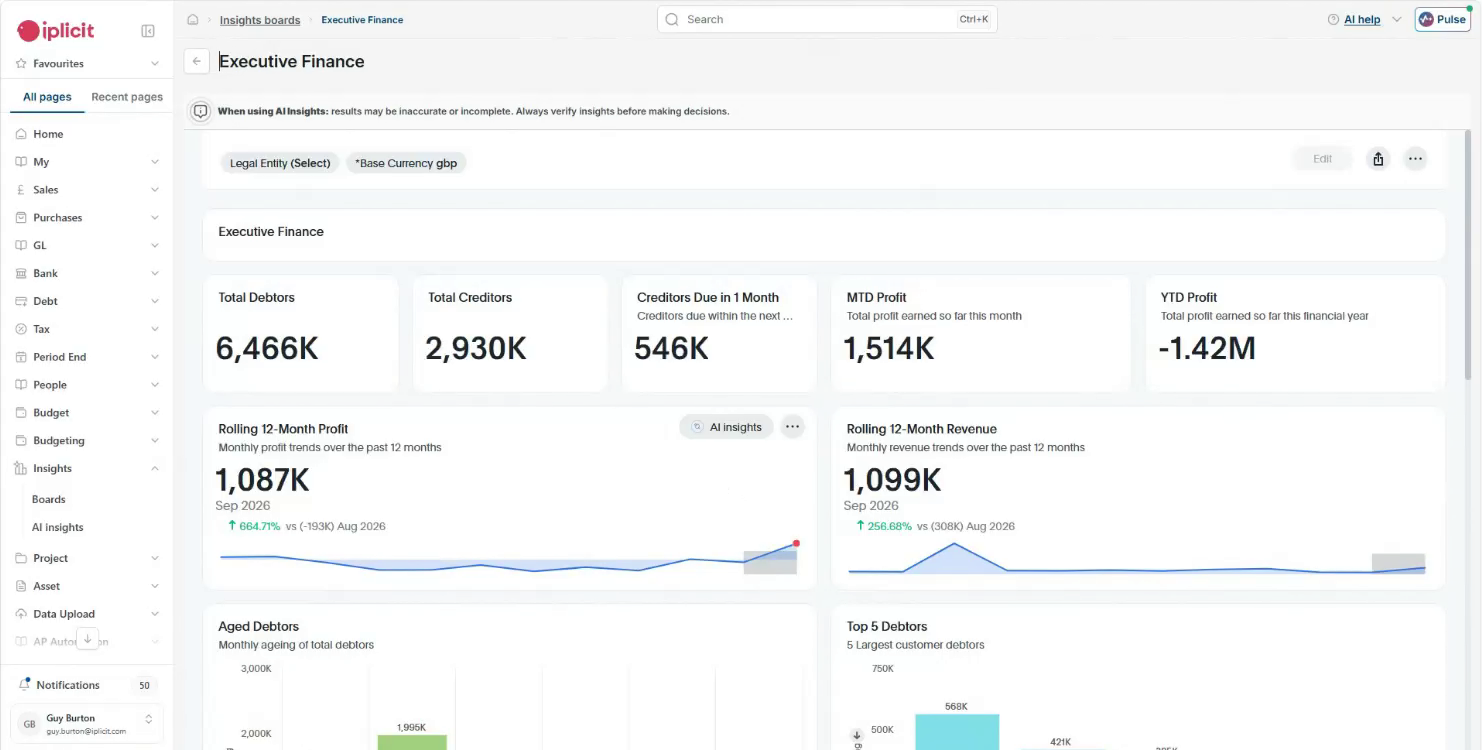
iplicit is a cloud accounting software designed for UK mid-market organisations that have outgrown entry-level systems like Xero and Sage 50. It consolidates accounts across entities and currencies in one system, with built-in intercompany accounting and drill-down to the source transaction. Once you record an intercompany transaction in iplicit, the platform creates the matching entry in the other entity, with eliminations handled for you.
These features are what made the difference for A-One Insurance Group, a commercial brokerage running nine companies. They started on Sage 50 and found Xero too basic when they looked at alternatives. Their Group Operations Director described consolidating on Sage 50 as an ordeal, saying, “We were driving the business blind.” With iplicit, they can now produce consolidated snapshots across all nine entities whenever they need them.
SEP2, a cybersecurity firm, also outgrew Xero and switched to iplicit as it expanded into Ireland and the US. Manual deferred income work that used to take two to three days a month is now fully automated. As its CFO put it, “what used to take three days now takes zero.”
That said, iplicit isn’t the right fit for everyone. If you’re a single entity on Xero and your reporting needs are straightforward, staying where you are will benefit you more. And if you need deep budgeting and FP&A, extensive CIS compliance, or a manufacturing bill of materials (BOM) module, iplicit has more limited capabilities in those areas than specialist tools. Also, for stock and inventory, iplicit integrates with Cin7 rather than handling it natively.
iplicit’s pricing is transparent. It’s an annual subscription that scales with your users and entities, with fund accounting, multi-entity, and multi-currency capability included rather than sold as extra modules. After you sign up, your data is migrated and tested in a sandbox, whether you’re moving from Xero or moving from Sage 50, and nothing goes live until you’ve signed it off.
Where to go from here
For one entity, it’s a short decision. For a group, neither answers the question.
If you run a single entity and have to choose between Xero and Sage 50, the decision usually comes down to one question: do you really need Sage 50’s built-in stock management and its payroll and CIS add-ons? If yes, choosing it, even if it costs more, is justified. If not, Xero and its network of add-ons will serve you just as well.
But if you run a multi-entity group, neither tool provides consolidated reporting without manual workarounds. A purpose-built group accounting platform like iplicit is the better fit for that.
You can book a demo to see how iplicit handles consolidation and group reporting, or take the Quick Tour to explore the platform at your own pace.
Is Xero or Sage 50 better for a small UK organisation?
Is Xero or Sage 50 better for a small UK organisation?
For most small UK organisations with a single entity and fewer than about 25 staff, Xero is the better choice. It’s cheaper (from £7/mo compared with Sage 50’s £129/mo), easier to learn, and better for collaborating with most UK accountancy practices. Sage 50 only wins if you specifically need built-in stock control, Sage 50 Payroll, or Sage’s CIS add-on.
Can Xero handle multiple companies?
Can Xero handle multiple companies?
Xero can run multiple companies, but each one needs its own separate subscription, and there’s no native way to consolidate financial data across those subscriptions. So, you’ll need to export to Excel or use a third-party app like Quick Consols. For organisations running more than two or three entities, this setup gets expensive and time-consuming quickly.
Does Sage 50 work in the cloud?
Does Sage 50 work in the cloud?
Sage 50 is primarily a desktop application, but Sage has added cloud-connected features that let you access certain functions through a browser. Full multi-user access, though, still depends on being on the same network or using a hosting provider.
Which is better for Making Tax Digital?
Which is better for Making Tax Digital?
Both Xero and Sage 50 are HMRC-recognised for MTD for VAT, and both let you submit VAT returns digitally from within the software. Xero is also preparing for MTD for Income Tax.
Can I switch from Sage 50 to Xero, or the other way around?
Can I switch from Sage 50 to Xero, or the other way around?
Yes, both types of migration are common. Xero has an import tool for Sage 50 data, and several migration specialists support moves in either direction. The main factor to consider is how much historical data you need to transfer. Sage 50 and Xero store data differently, so you’ll need to plan which records and transaction history to migrate. An accountant familiar with both platforms can help you choose the cleanest path.